Budy POS for Thai Cannabis Dispensaries: A Practical Guide
Why Thai cannabis dispensaries are upgrading from generic POS to Budy in 2026. Strain management, bilingual UI, Bluetooth scale, offline-first, and records that hold up.


Running a cannabis dispensary in Thailand in 2026 is not what it was in 2022. The early gold-rush energy has settled into a more professional market: tighter record-keeping expectations, more educated customers, and real competition on the corner. The stores that are pulling ahead have two things in common. They treat the product with the specificity it deserves — strains, potency, terpenes, weight — and they run on software that was built for their workflow, not bent into it.
If you’re running a dispensary in Bangkok, Chiang Mai, Phuket, or anywhere in between and you’re still stretching a generic POS (Loyverse, Square, Storehub) to do a job it wasn’t designed for, this article is for you. We’ll walk through the workflows that matter for a Thai dispensary, where generic tools fall short, and how Budy is built around how you actually operate.
The regulatory climate, without the scaremongering
We won’t pretend to give you legal advice. The regulatory environment for cannabis in Thailand has been evolving since 2022 and will keep evolving. What that means for an operator is simple: you need clean, accurate, auditable records of what came in, what went out, to whom, at what weight, and at what price. Whatever the final shape of the rules, those records protect you.
A POS is not a compliance product. It’s a tool. But a POS that captures strain, weight, batch, supplier, and member data as a normal part of every sale gives you records that are ready the day a regulator, landlord, or accountant asks for them. A generic POS that tracks “item sold x1” does not.
Strain management as a first-class concept
In a generic POS, a gram of Gelato #33 and a gram of Northern Lights are two SKUs. That’s it. No THC percentage, no CBD, no effect profile, no genetics, no terpene dominance, no batch. If you want any of that on a label or a receipt, you type it manually. Every time. Or it lives in a Google Doc that nobody updates.
Budy has a dedicated Strain entity separate from products. One strain record carries:
- THC and CBD percentages
- Terpene profile
- Effect tags (relaxing, creative, sleep, focus)
- Genetics and lineage
- Grower and batch metadata
- Photography and descriptions
Products link to strains. When you add a new batch of Gelato #33 as a product, the strain data comes along — on receipts, on labels, on the customer-facing web shop, on the cast display TV. Update the strain once, and every product linked to it stays in sync.
Weight-based pricing that actually works on the counter
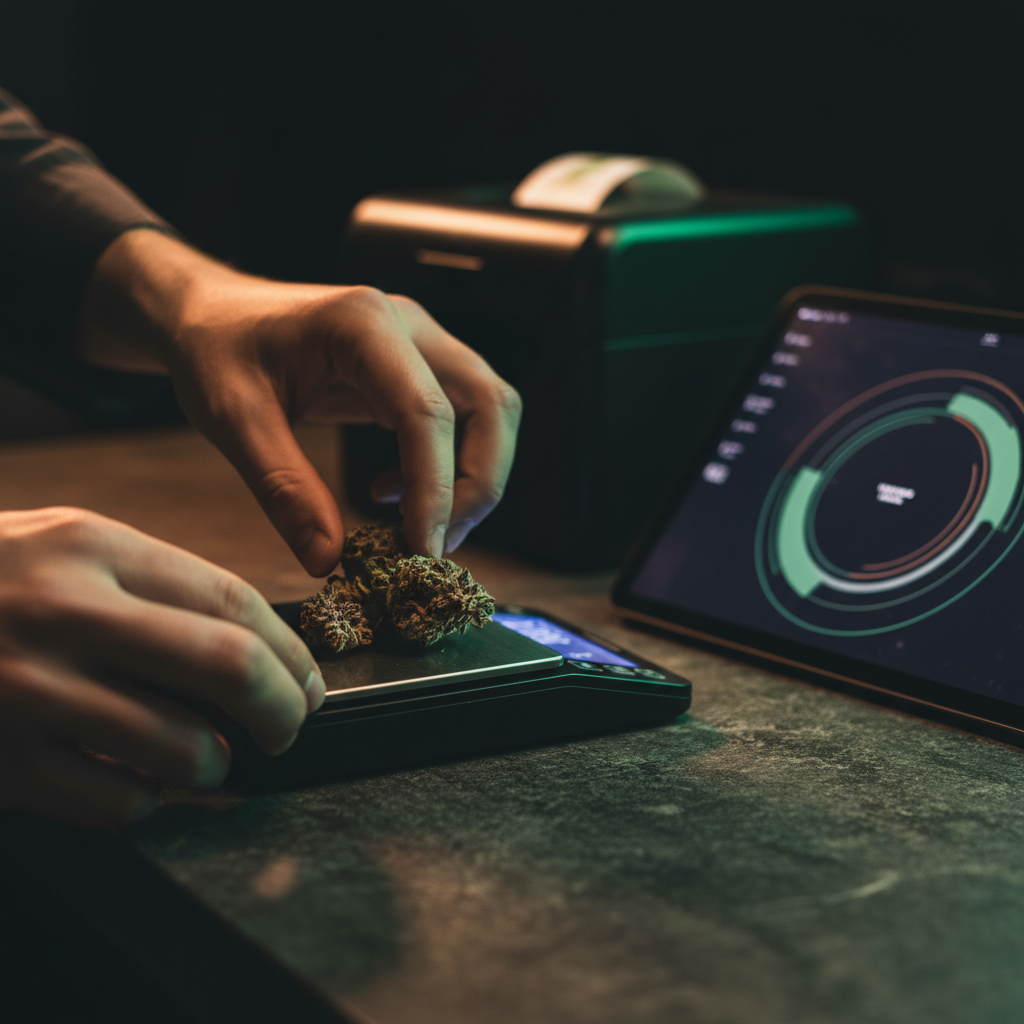
A budtender in a busy Thai dispensary weighs flower thirty to fifty times a day. Every one of those interactions is a place where a generic POS creates friction: scoop, weigh on a separate scale, read the grams, tap into the tablet, calculate the price in your head, type it in, hope you got it right, stick a label on the jar.
Budy integrates with Acaia Lunar Bluetooth precision scales natively. The workflow on the counter looks like this:
- Scan the strain (or tap it on the product grid)
- Place the jar and scoop flower on the scale
- Grams stream live into the line item
- The price calculates from the strain’s per-gram rate in real time
- Tap to print a Niimbot thermal label with strain, weight, THC, batch, and date
There is no mental math, no double entry, no “did I hit 1.0 or 10 grams?” moment. The scale is not an accessory. It’s part of the transaction.
This also matters at month-end. Weights are captured at the precision the scale provides, not rounded by a budtender typing 1g for anything between 0.9 and 1.1. Your inventory reconciliation starts to actually match what you sold.
Thai and English, the same store, the same menu
A dispensary in Sukhumvit or Nimman serves a mixed customer base — Thai locals, long-term expats, tourists from Europe and Asia. Your menu needs to work in both Thai and English without becoming two menus you have to keep in sync by hand.
Budy is bilingual by design. The POS UI, the admin dashboard, and the customer-facing web shop all switch between Thai and English with a single control. More importantly, the product catalogue is bilingually translated by AI. Add a new strain or edible in English, and Budy generates the Thai translation for the name, description, attributes, and variants — auto-re-translated when the master record changes.
Your Thai budtenders work in Thai. Your English-speaking customers see English on the cast display TV and on the receipt. Same store, same data, no duplicate entry. If you configure additional languages (Chinese, Japanese, German — common in tourist-heavy areas), the same pipeline handles them.
Members and repeat customers
Cannabis customers in Thailand are repeat buyers. A tourist passes through once. A long-term resident comes back every two weeks for the next three years. The economics of a dispensary are built on the second customer, not the first.
A real membership program is not a sticker on the window. It’s:
- A unique identifier tied to the customer (phone, LINE ID, email)
- A profile that remembers preferences (preferred strains, usual weights, sensitivities)
- Points or credit that accrue on every purchase
- Rewards that redeem at the counter, not through a separate app the customer forgot to download
- Purchase history the budtender can glance at to have a real conversation
Budy has all of this built in — no add-on, no integration, no second app. When a returning customer walks up, the budtender types a phone number, the profile loads, the member’s usual strains surface, points balance is visible, and redemptions are one tap. The loyalty layer runs on the same local database as the rest of the POS, so it works during an ISP outage too.

Offline-first, because internet in Thailand is mostly fine, except when it isn’t
Most of the time, your connection is fine. Once a month, it isn’t — a fiber cut on your soi, a router reboot, a storm, a power outage, a cloud provider hiccup half the planet away. A generic cloud POS slows down, fails to sync, or stops accepting sales entirely.
Budy runs offline-first. ObjectBox is the primary local database on every POS device — the cloud backend is a sync target, not the system of record. Practically:
- Every POS, tablet, and phone in the store holds the full catalogue and member list locally
- Sales, inventory moves, and member updates work with zero internet
- Devices on the same Wi-Fi keep each other in sync via local ObjectBox Sync Server
- Staff can log in offline with a cached password, a PIN, or face recognition
- When the connection returns, everything reconciles automatically
If you’ve ever had to refund a frustrated customer at the end of a queue because your cloud POS “lost the connection,” you already know why this matters.
Records that hold up
Back to record-keeping. Here’s what a Budy sale captures, automatically, on every transaction:
| Data point | Captured | Source |
|---|---|---|
| Strain name and genetics | ✓ | Strain entity |
| THC / CBD percentage | ✓ | Strain entity |
| Exact weight sold (g) | ✓ | Bluetooth scale |
| Batch / harvest ID | ✓ | Product attribute |
| Supplier | ✓ | Purchase record |
| Member (optional) | ✓ | Member profile |
| Staff member on duty | ✓ | Session |
| Timestamp and device | ✓ | Automatic |
| Price, discount, tax | ✓ | Invoice |
None of this is add-on work for the budtender. It falls out of doing the sale correctly in the first place. That’s the shift: record-keeping is not a second job at the end of the day — it’s a byproduct of the sale.
Where generic POS still has the edge
We try to be honest about this. A generic POS like Loyverse has a larger third-party integration marketplace, more legacy tutorials, and a simpler mental model if all you want is “ring up a SKU and see daily sales.” If you’re running a five-item menu with fixed weights and no ambition to scale, a generic POS will get you to ninety percent.
The other ten percent is where the market is going. And once you’re past two or three staff, three or four daily price adjustments for weight, and a growing repeat-customer base, the math stops working.
For a deeper Budy-vs-Loyverse breakdown, see our comparison post on Budy vs Loyverse for cannabis dispensaries. For the category-level view, the specialty vs generic POS guide covers why purpose-built tools win over time.
What it looks like to switch
Migrating a dispensary POS feels scary and then turns out to be smaller than you thought. In practice:
- Catalogue import — we take a CSV of your current products and strains and load it into Budy. The AI Smart Scanner fills in missing fields from product photos.
- Hardware check — if you already have a Bluetooth scale and a thermal label printer, we confirm compatibility. If not, we’ll tell you exactly which models we’ve tested in Thailand.
- Bilingual setup — your existing English product names get Thai translations generated. You review and tweak.
- Staff training — Budy’s UI is close enough to what your budtenders already use that the training is a one-hour session, not a week.
- Parallel run (optional) — some stores run Budy alongside their old POS for a week to compare. We don’t mind.
There’s no multi-month implementation project. A small Thai dispensary can go live in a few days.
The honest bottom line
If your store is small, your menu is short, and you’re not trying to grow, a generic POS is fine. It was built for you.
If you run a modern Thai dispensary with a real strain catalogue, weight-based pricing on half your SKUs, bilingual customers, a growing member base, and records that need to be ready when someone asks — you are the customer Budy was built for. We’d like to show you what it looks like on your counter.
Email us at support@budy.app and we’ll set up a walkthrough. If you want to read more first, the AI Smart Scanner deep dive and the Bluetooth scale integration page cover two of the workflows this article touches on.